Custom providers - proof of concepts
Where can I get ready-made custom provider files for Wando?
Download a .wandoprovider file below and drag it onto Wando Pro's main window, then approve it and enter your own API key. Eight providers and 479 models are covered.
Here you’ll find all of our proof-of-concept files for custom providers, to give you a jump start on the custom provider system in Wando Pro. There are eight of them, covering 400+ image models between them. To install one, drag it onto Wando Pro’s main window and add your own API key for that provider.
Overview
Last updated 10/20/26: the files now update themselves from this page in Wando 1.0.15 or later (see Keep them up to date). Added FLUX 3 wherever it’s offered, plus FLUX 3 Klein, Ideogram V4.5, Krea 3, Bria FIBO 2.0, MOSS Image, Riverflow 2.5, Recraft V4.1 Utility and new fal image tools.
10/16/26: added Krea (Krea 2 and Krea 3 Beta).
New to custom providers? Start with the Custom Providers setup quickstart, which walks through installing a file step by step.
These files show what a provider file can do, and you can install them as they are. Wando does not maintain them, ship them in the app, offer support for them, or endorse the use of these providers. You need your own account and API key with each provider, and the provider bills you directly.
Details
| Provider | Download | Updated | Models | Key and setup | How your images are sent | Cost recorded |
|---|---|---|---|---|---|---|
| Krea | Download | 10/20/26 | 2 tabs: Krea 2 (Medium, Large, Turbo) and Krea 3 Beta | Krea API token | Inline in the request | Estimate from Krea’s published prices |
| Black Forest Labs | Download | 10/20/26 | 21 endpoints in 20 tabs, 4 families | BFL API key | Inline in the request | Actual, from BFL’s reported credits |
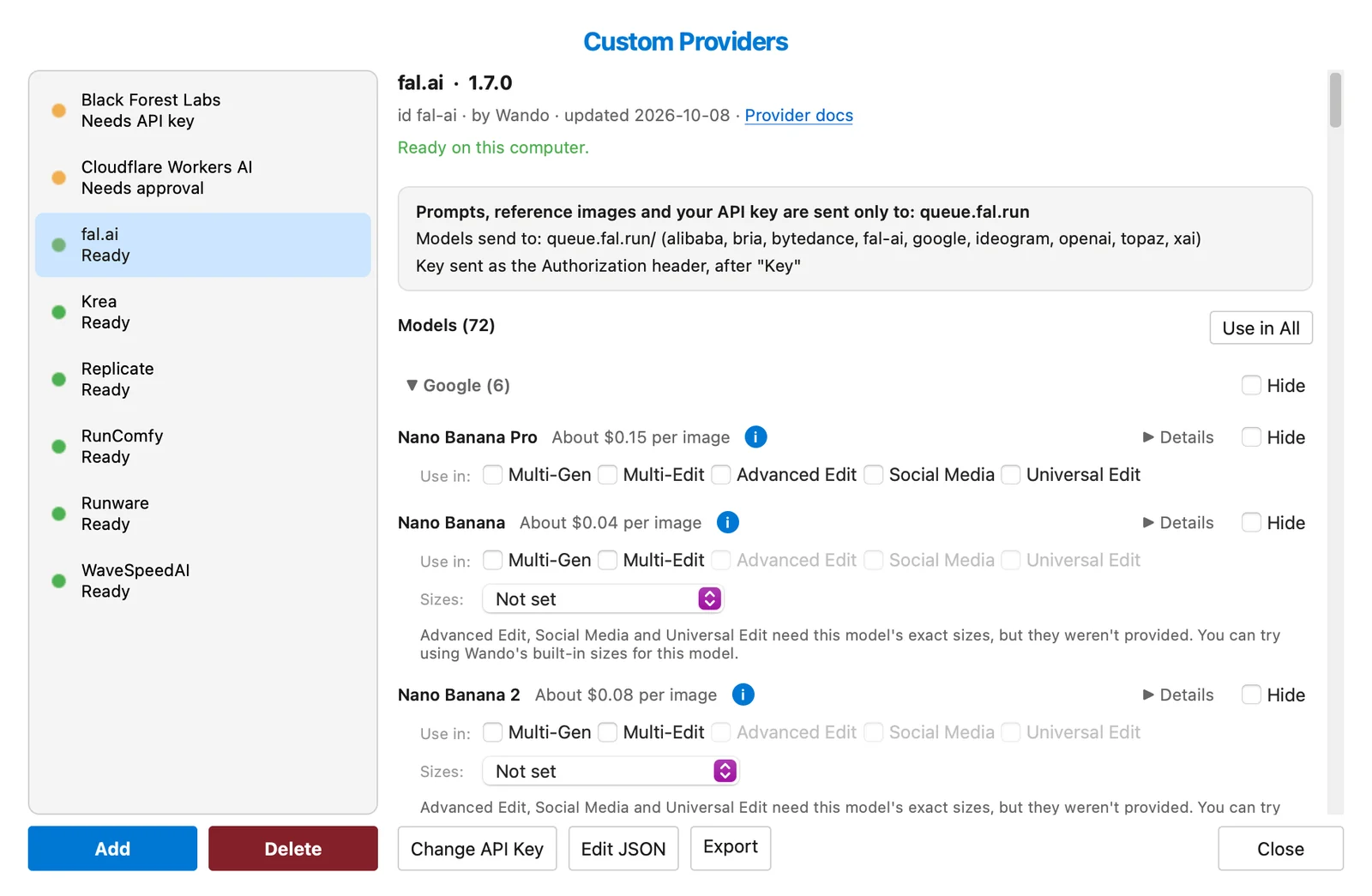
| fal.ai | Download | 10/20/26 | 84 models, 12 families | fal.ai API key | Inline in the request | Estimate, worked out from the sizes fal returns |
| Replicate | Download | 10/20/26 | 79 models, 12 families | Replicate API token (starts with r8_) |
Uploaded to Replicate’s file storage | Estimate, or GPU seconds for community models |
| Runware | Download | 10/20/26 | 82 models, 18 families | Runware API key | Inline in the request | Actual, reported by Runware |
| RunComfy | Download | 10/20/26 | 57 models, 10 families | RunComfy API token | Inline; 4 models need Cloudflare R2 | Actual, reported by RunComfy |
| WaveSpeedAI | Download | 10/20/26 | 145 models, 17 families | WaveSpeedAI API key | Uploaded to WaveSpeed’s storage | Estimate from WaveSpeed’s Pricing API |
| Cloudflare Workers AI | Download | 10/20/26 | 10 models, 3 families | API token plus account ID | Inline in the request | Estimate; DreamShaper is unpriced |
What each file includes
Krea
Krea 2 has Medium, Large and Turbo versions, an optional source image with denoising strength, up to ten style references each with its own strength, saved moodboards and trained style IDs. Krea 3 Beta generates or edits with up to eight references at 1K or 2K, with Fast or High thinking, regional edit, negative prompts, and Custom and Presets size modes. Both tabs offer Zero Data Retention and join Multi-Gen, Multi-Edit, Advanced Edit, Social Media and Universal Edit. Read more in Custom provider - Krea.
Black Forest Labs
- FLUX 3: FLUX 3 Image and FLUX 3 Klein, with Layout Regions for drawing bounding boxes
- FLUX.2: Max, Pro, Pro Preview, Flex, Klein 9B, Klein 9B Preview, Klein 4B
- Image Tools: Outpainting, Erase, Deblur, Virtual Try-On (V2 by default, with a V1 selector)
- FLUX.1: Kontext Max, Kontext Pro, 1.1 Pro Ultra / Raw, 1.1 Pro, Fill Pro, Expand Pro, Dev (Hosted API)
fal.ai
- Google: Nano Banana Pro, Nano Banana, Nano Banana 2, Nano Banana 2.1, Nano Banana Lite, Nano Banana 2 Lite
- OpenAI: GPT Image 2, GPT Image 2.5 Flare, GPT Image 2.5 Sunburst, GPT Image 1.5, GPT Image 1 Mini
- FLUX: FLUX 3, FLUX 3 Klein, FLUX.2 [pro], FLUX.2, FLUX.2 Flash, FLUX.2 Max, FLUX.2 Flex, FLUX.2 Klein 4B, FLUX.2 Klein 9B, FLUX.1 Kontext Pro, FLUX.1 Kontext Max, FLUX.1 Dev, FLUX.1 Schnell, FLUX1.1 Pro, FLUX1.1 Pro Ultra, FLUX.1 Fill Pro
- Seedream: Seedream 4.5, Seedream 5 Pro, Seedream 5 Flash, Seedream 5 Lite, Seedream 4
- Ideogram: Ideogram V4.5, Ideogram V3, Ideogram V3 Transparent, Ideogram V4, Ideogram V4 Fast, Ideogram V4 Instant, Ideogram V3 Reframe
- Qwen: Qwen Image 3, Qwen Image 2512, Qwen Image Edit Plus, Qwen Image Edit 2511, Qwen Image Inpaint, Qwen Image Layered
- Recraft: Recraft V3, Recraft V4, Recraft V4.1, Recraft V4 Pro, Recraft V4 Vector, Recraft V4.1 Vector, Recraft V4.1 Pro
- Grok: Grok Imagine, Grok Imagine 2
- More: Krea 3, MOSS Image, Hunyuan Image 3, Luma Photon, MiniMax Image-01, Sana Sprint
- Upscale & Restore: Recraft Crisp Upscale, Topaz Creative Upscale, Topaz Precision Upscale, Topaz Generative Upscale, Clarity Upscaler, ESRGAN Upscaler, SeedVR2 Upscale, Phota Enhance
- Image Tools: Bria FIBO 2.0, Bria Background Remove, Bria Guided Background Removal, Bria Eraser, Bria Expand, Bria Product Holding, Bria Virtual Try-On, BiRefNet V2, Background Remover, Ideogram Object Removal, Phota Edit, IC-Light Relight, PATINA Material Maps, Marigold Depth, Image2Pixel
- Vector: Recraft Vectorize
Replicate
- Google: Nano Banana Pro, Imagen 4, Nano Banana, Nano Banana 2, Nano Banana 2.1, Nano Banana 2 Lite, Gemini 2.5 Flash Image
- FLUX: FLUX 3, FLUX.2 [pro], FLUX.1 Kontext [pro], FLUX1.1 [pro], FLUX.2 [dev], FLUX.2 [max], FLUX.2 [flex], FLUX.2 Klein 4B, FLUX.2 Klein 9B, FLUX.1 Kontext [max], FLUX.1 Kontext [dev], FLUX Fill Pro, FLUX.1 [schnell], FLUX.1 [dev], FLUX.1 Fill [dev], FLUX1.1 [pro] Ultra, FLUX.1 Krea [dev]
- Ideogram: Ideogram 3.0 Turbo, Ideogram 3 Inpaint, Ideogram V4, Ideogram V4.5, Ideogram V4.5 Precise Edit
- Seedream: Seedream 4.5, Seedream 4, Seedream 5 Lite, Seedream 5 Pro
- OpenAI: GPT Image 2, GPT Image 2.5 Flare, GPT Image 2.5 Sunburst, GPT Image 1.5
- Qwen: Qwen Image 2, Qwen Image 3, Qwen Image Edit Plus, Qwen Image Edit 2511, Qwen Image 2512, Qwen Image
- Recraft: Recraft V3, Recraft V4, Recraft V4 Pro, Recraft V4 SVG, Recraft V4.1, Recraft V4.1 SVG, Recraft V4.1 Utility
- Vector: Arrow, Arrow Vectorize, Recraft Vectorize
- Upscale & Restore: Topaz Upscale, CodeFormer, GFPGAN, Recraft Crisp Upscale, Google Upscaler, Real-ESRGAN, Clarity Upscaler, P-Image Upscale
- Image Tools: Background Remover, Sticker Maker, Remove Background, BiRefNet
- More: Sana, Grok Imagine, Z-Image Turbo, SDXL Lightning, ControlNet Scribble, Luma Photon, MiniMax Image-01, Krea 3, Riverflow 2.5
- Pruna: P-Image, P-Image Edit, FLUX Kontext Fast, FLUX Fast, HiDream L1 Fast
Runware
- Google: Nano Banana Pro, Nano Banana 2, Nano Banana 2.1, Nano Banana 2 Lite
- OpenAI: GPT Image 2, GPT Image 2.5 Flare, GPT Image 2.5 Sunburst
- FLUX: FLUX 3, FLUX 3 Klein, FLUX.2 [pro], FLUX.2 [max], FLUX.2 [flex], FLUX.2 [dev], FLUX.2 [klein] 9B, FLUX.2 [klein] 4B, FLUX.1 Kontext [pro], FLUX.1 Kontext [max], FLUX.1 Kontext [dev], FLUX1.1 [pro], FLUX1.1 [pro] Ultra, FLUX.1 [dev], FLUX.1 [schnell], FLUX.1 Krea [dev]
- FLUX Tools: FLUX.1 Fill [pro], FLUX.1 Expand [pro], FLUX Outpainting, FLUX Erase, FLUX Virtual Try-On
- Seedream: Seedream 4.5, Seedream 5.0 Pro, Seedream 5.0 Lite, Seedream 5.0 Flash, Seedream 4.0
- Qwen: Qwen Image 3.0, Qwen Image 2.0, Qwen Image 2512, Qwen Image Edit 2511
- Wan: Wan 2.7 Image, Wan 2.6 Image
- Z-Image: Z-Image, Z-Image Turbo
- Ideogram: Ideogram 4.5, Ideogram 4.0, Ideogram 3.0, Ideogram 3.0 Edit, Ideogram 3.0 Reframe, Ideogram 3.0 Background
- Recraft: Recraft V4, Recraft V4.1, Recraft V4.1 Utility, Recraft V4 Vector, Recraft V4 Styles
- Kling: Kling Image O3, Kling Image 3.0
- Krea: Krea 2, Krea 2 Turbo
- Grok: Grok Imagine 2.0, Grok Imagine
- Bria: Bria FIBO, Bria 3.2, Bria Replace Background
- More: P-Image, Runway Gen-4 Image, Luma UNI-1, ImagineArt 2.0, Riverflow 2.5, Muse Image, Vidu Q1 Image, HiDream-I1, ERNIE-Image
- Upscale & Restore: Topaz Wonder 3.5, Clarity Upscaler, Real-ESRGAN, P-Image Upscale, Bria Increase Resolution
- Image Tools: Bria Remove Background, BiRefNet, Ideogram Remove Background, Ideogram Object Remover, Object Eraser
- Vector: Recraft Vectorize, Picsart Vectorizer
RunComfy
- FLUX: FLUX.2, FLUX 3, FLUX.1 Kontext, FLUX.2 Klein, FLUX1.1 Pro, FLUX.1 Kontext Dev, FLUX.1 Schnell
- Google: Nano Banana Pro, Nano Banana 2, Nano Banana 2.1, Nano Banana, Nano Banana 2 Lite, Gemini 3 Pro, Imagen 4
- OpenAI: GPT Image 2.5, GPT Image 2, GPT Image 1.5, GPT-4o Image
- Seedream: Seedream 5.0 Pro, Seedream 5.0 Lite, Seedream 4.5, Seedream 4.5 Series, Seedream 4.0, Seedream 4.0 Series, Dreamina 4.0
- Qwen: Qwen Image 3.0, Qwen Image 2.1, Qwen Image 2.1 Inpaint, Qwen Image 2512, Qwen Image, Qwen Edit 2509, Qwen Edit Effects, Qwen Image Layered
- Wan: Wan 2.7, Wan 2.6, Wan 2.5, Wan 2.2
- Z-Image: Z-Image Turbo, Z-Image Inpaint
- Ideogram: Ideogram V4, Ideogram 3.0, Ideogram 3.0 Edit, Ideogram 3.0 Background, Ideogram 3.0 Reframe, Ideogram 2.0
- Chrono & Upscale: Chrono Edit, Chrono Paintbrush, Chrono Upscaler, Crystal Upscaler
- More: Recraft V3, Vidu Q2, Grok 2 Image, LongCat Image, ImagineArt 1.5, Step1X Edit 2, Ovis Image, SAM 3
FLUX.1 Kontext editing, Kontext Dev, Z-Image Turbo with an image and Z-Image Inpaint only accept image links, so those need Cloudflare R2 set up in Wando Settings.
WaveSpeedAI
- Google: Nano Banana Pro, Nano Banana 2, Nano Banana 2.1, Nano Banana 2 Lite, Nano Banana
- OpenAI: GPT Image 2, GPT Image 2.5, GPT Image 1.5
- FLUX: FLUX 3, FLUX 3 Klein, FLUX.2 [pro], FLUX.2 [max], FLUX.2 [flex], FLUX.2 [dev], FLUX.2 [flash], FLUX.2 [klein] 9B, FLUX.2 [klein] 4B, FLUX.1 Kontext [pro], FLUX.1 Kontext [max], FLUX.1 Kontext [dev], FLUX1.1 [pro], FLUX1.1 [pro] Ultra, FLUX.1 [dev], FLUX.1 [schnell], FLUX.1 Fill [dev], FLUX.1 Redux, FLUX ControlNet, FLUX SRPO
- Seedream: Seedream 5.0 Pro, Seedream 5.0 Lite, Seedream 5.0 Flash, Seedream 4.5, Seedream 4.0, Seedream Layers
- Qwen: Qwen Image 3.0, Qwen Image 2.0, Qwen Image Max, Qwen Image 2512, Qwen Image, Qwen Multiple Angles, Qwen Image Layered
- Wan: Wan 2.7, Wan 2.6, Wan 2.5, Wan 2.2
- Z-Image: Z-Image Turbo, Z-Image, Z-Image Inpaint, Z-Image ControlNet
- Ideogram: Ideogram V4.5, Ideogram V4, Ideogram V3, Ideogram V3 Transparent, Ideogram Character
- Recraft: Recraft V4.1, Recraft V4.1 Vector, Recraft V4, Recraft V4 Vector, Recraft V4 Styles, Recraft V3, Recraft V3 SVG
- Kling: Kling Image O3, Kling Image 3.0, Kling Image O1
- Grok: Grok Imagine 2.0, Grok Imagine Quality, Grok Imagine
- Bria: Bria FIBO 2.0, Bria FIBO, Bria FIBO 1.5, Bria 3.2, Bria GenFill, Bria Expand, Bria Background, Bria Image Blend, Bria Product Holding, Bria Virtual Try-On, Bria FIBO Tools
- Characters: Instant Character, USO, UNO, FLUX PuLID, Phota
- More: Luma Photon, Luma UNI-1, Runway Gen-4 Image, MAI-Image-2.5, Muse Image, MiniMax Image-01, MiniMax H3, Vidu Q2, Riverflow 2.0 Pro, P-Image, Krea 3, Krea 2, Krea 2 Medium, Krea 2 Turbo, Cosmos 3 Super, Chrono Edit
- Open Models: Hunyuan Image 3, Hunyuan 3 Instruct, Hunyuan Image 2.1, HiDream-I1, HiDream-O1, HiDream-E1, ERNIE-Image, GLM-Image, LongCat Image, Boogu Image, BitDance 14B, MOSS Image, Nucleus Image, Neta Lumina, Step1X Edit, FireRed Edit, JoyAI Edit
- Upscale: Image Upscaler, Ultimate Upscaler, SeedVR2, VOSR2, Crystal Upscaler, Clarity Upscaler, Recraft Crisp Upscale, Recraft Creative Upscale, Bria Increase Resolution, P-Image Upscale, Real-ESRGAN
- Image Tools: Remove Background, Eraser, Image Eraser, Remove Text, Watermark Remover, Extract Object, Zoom Out, IC-Light, Translate Text, Depth Map, Face Blur, Face Enhancer, Photo Colorizer, Topaz, Phota Enhance, PATINA Material, PATINA Maps, PATINA Extract
A starter WaveSpeed account runs one job at a time, so a second job waits until the first finishes.
Cloudflare Workers AI
- FLUX: FLUX.2 [klein] 9B, FLUX.2 [klein] 4B, FLUX.2 [dev], FLUX.1 [schnell]
- Leonardo: Lucid Origin, Phoenix 1.0
- Stable Diffusion: Stable Diffusion XL, SDXL Lightning, DreamShaper 8 LCM, Stable Diffusion 1.5 Inpaint
Choose Configure after installing and enter both your Cloudflare API token and your account ID. No Worker deployment or R2 bucket is needed. This file was tested against Cloudflare’s documented schemas and simulated responses, not a live token.
Install one of these files
- Download the
.wandoproviderfile from the table above. - Drag it onto Wando Pro’s main window. The review opens on its own.
- Check which hosts receive your prompts, images and key, paste your key, and click Approve & Install.
- Pick the provider under Cloud Provider > Custom.
You can drag several files in at once. These files need Wando 1.0.15 or later; earlier versions report update_url as an unknown key.
Keep them up to date
Each file names the address it’s published at on this page. In Manage Custom Providers, click Check for Updates at the top of the list, or turn on Check custom providers for updates at startup in Settings > Privacy (it’s off until you turn it on). When we publish a newer version, Wando shows the same review as installing a file, and nothing replaces your copy until you approve it.
Installed one of these before 10/20/26? Those copies have no update address, so download the file once more and drag it in. From then on it can update itself.
If you change one of these files, delete its update_url first; the AI guide in Wando tells your assistant to do the same. Otherwise an update would replace your changes with ours. Wando also skips a provider you edited with Edit JSON in its startup check, and warns before an update replaces it.
These files are dated
Each file records the day it was last updated, in the table above and in its updated and notes fields. Provider schemas and prices change. If a model stops working, use Copy Debug Report on the error and paste it into your AI assistant along with the file. It can send back a corrected version, and we refresh these files from time to time; Check for Updates picks up each refresh.
Frequently Asked Questions
Are these provider files supported by Wando?
No. They show what a provider file can do and you can install them as they are, but Wando does not maintain them, ship them in the app, offer support for them, or endorse these providers.
How do I install a proof-of-concept provider file?
Download the .wandoprovider file and drag it onto Wando Pro's main window. Check where it sends your data, paste your API key and click Approve & Install.
Do I need an account with each provider?
You need your own account and API key with each provider, and the provider bills you for generations, not Wando.
What if a provider changes its API or prices?
Each file records the day it was last updated. In Wando 1.0.15 or later, click Check for Updates in Manage Custom Providers, or turn on the startup check in Settings > Privacy, to get our refreshed files. You review each update before it replaces your copy.
I changed one of these files. Will an update overwrite it?
Delete its update_url first, or ask your AI assistant to. Otherwise Check for Updates offers to replace your changes with our next version.